









How is no one talking about the most recent kindle update?!
byu/Charming-Willow7195 inkindle
A recent Kindle software update is turning one of its most basic tools — bookmarks — into a headache, with readers also fuming over a revamped dictionary pop-up and chunkier chapter layout. The changes are tied to firmware version 5.18.6 and newer, which Amazon is rolling out to recent Kindles, including devices like the Kindle Paperwhite and Kindle Scribe.
Before this update, adding a bookmark meant tapping a clear icon that opened a compact dropdown list you could skim in a couple of seconds. Now, users say they have to hit a tiny hot corner near the top‑right of the page to set a bookmark, and viewing them dumps you into a full‑screen “Annotations” view instead of that quick menu. Each bookmark appears as a tall card mixed in with notes and highlights, so anyone juggling dozens or hundreds of markers has to scroll through a feed instead of glancing at a tight list, which is why several threads describe bookmarks as effectively “useless” after the update.
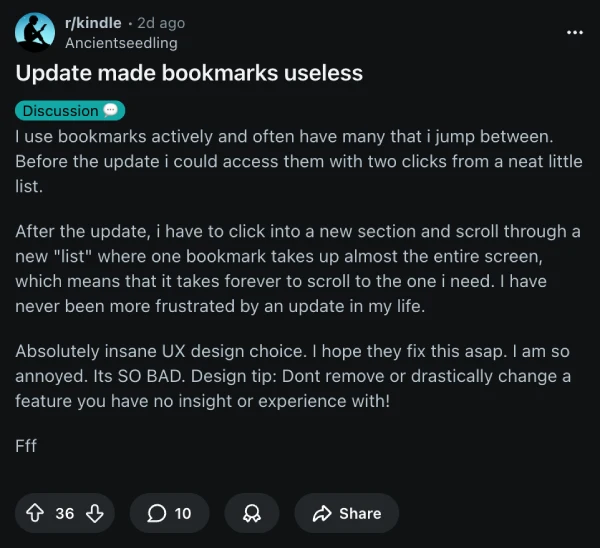
That hit is especially brutal for power readers and students who jump between references or use Kindle Scribe to mark up big PDFs and musical scores.
The dictionary overhaul isn’t going over much better. Instead of a pop‑up that appears near the word you tapped, the new interface slides in as a narrow panel anchored to the bottom of the screen, forcing your eyes away from the line you’re on and shrinking the definition text to what some describe as eye‑strain territory. Swiping between dictionary, Wikipedia, and translation panes has also been replaced by tiny tabs you have to tap individually, which adds friction for language learners and accessibility‑minded readers who relied on that quick gesture cycle.
Not everyone hates the new look. A few readers say they prefer the dictionary living at the bottom because it no longer covers half the page, and some early adopters claim the refreshed highlight and lookup UI feels faster and more modern overall. But even some of those defenders admit the controls and icons — like the new highlight toolbar and selection handles — are now so small on devices like the Kindle Paperwhite that basic actions feel fiddlier than they used to.
Chapters are getting a visual shake‑up too. Readers are reporting bolder, more spaced‑out chapter headers that take up more vertical room, plus new “chapter complete” treatments and tweaked progress readouts for time left in chapter that don’t mesh well with every book. For some, the redesigned chapter list in the “Go To” menu looks busier and less glanceable, which is a problem if you rely on it to hop around long novels or nonfiction.
Layered on top of the UX drama are a handful of stability complaints from Kindle Paperwhite owners, who say their devices have been freezing, randomly claiming their library is empty, or locking up when switching modes, often requiring hard restarts or even factory resets. It’s not clear how directly those bugs tie to 5.18.6, but they’re surfacing in the same window as the UI rollout.
This update is rolling out automatically, and there’s no official way to roll back. Some users say even the on‑device feedback option has disappeared. Amazon has yet to issue a statement or even acknowledge the backlash. That said, for an overview of everything new with the update, you can watch this useful video by Charlie Samways:
TechIssuesToday primarily focuses on publishing 'breaking' or 'exclusive' tech news. This means, we are usually the first news website on the whole Internet to highlight the topics we cover daily. So far, our stories have been picked up by many mainstream technology publications like The Verge, Macrumors, Forbes, etc. To know more, head here.



Dwayne Cubbins
1453 Posts
For nearly a decade, I've been deciphering the complexities of the tech world, with a particular passion for helping users navigate the ever-changing tech landscape. From crafting in-depth guides that unlock your phone's hidden potential to uncovering and explaining the latest bugs and glitches, I make sure you get the most out of your devices. And yes, you might occasionally find me ranting about some truly frustrating tech mishaps.


Comments
Follow Us

