









Disney+ users are reporting video stuttering and jitter when watching movies and shows on Chromecast with Google TV, Android TV, and other Android-based streaming devices.
The complaints have been piling up on Reddit over the past couple of weeks, with users describing a brief but noticeable frame skip every 15 to 30 seconds. Audio usually stays in sync, but the picture appears to hitch, then quickly catch up, which makes the issue hard to ignore once you spot it.
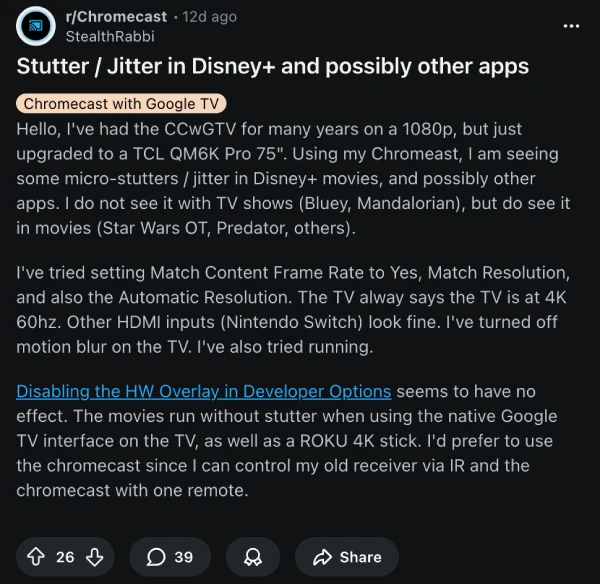
One of the most active threads comes from Reddit user StealthRabbi in the r/Chromecast community, who says the problem shows up consistently in Disney+ movies like Star Wars and Predator. Interestingly, TV shows such as The Mandalorian and Bluey appear mostly unaffected. The same content plays smoothly when using a Roku stick or a TV’s native Google TV app, pointing the finger squarely at the Disney+ Android app or how it interacts with certain hardware.
Other users back that up. People with Nvidia Shield, Amazon Fire TV, Fire Stick, and even newer Google TV Streamer devices are seeing the same stutter, while Netflix, Prime Video, Apple TV+, and YouTube run just fine on the same setups. Several users say they’ve ruled out bandwidth entirely, with speed tests well above 200 Mbps and no issues on other HDMI inputs like game consoles.
Visually, the problem looks like a dropped frame rather than classic judder. A character might freeze for a split second, then move slightly faster for a few frames to stay synced with the audio. That distinction matters, because it suggests this is not just a basic refresh rate mismatch, but potentially a decoding or playback bug in the app itself.
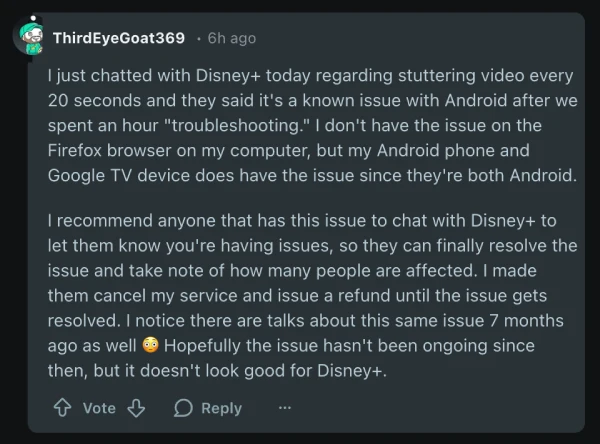
Another user, ThirdEyeGoat369, says they directly contacted Disney+ support after seeing stutters roughly every 20 seconds on both a Google TV device and an Android phone. According to their chat with support, Disney+ acknowledged the problem as a known issue on Android after an extended troubleshooting session.
A few workarounds exist, but none are ideal. Some Nvidia Shield owners say manually setting the output to 4K 23.976Hz reduces the stutter, though it can break Dolby Vision or cause issues in other apps. Others report that casting from a phone avoids the problem entirely, which again suggests the native app is the culprit.
For now, the best advice is to report the issue directly to Disney+ support and, if possible, use an alternate device. Hopefully, a proper fix is not far off.
This isn’t the only recent technical headache for the service. We recently covered how Disney+ quietly removed Dolby Vision and 3D support in Germany on our sister site PiunikaWeb, another change that left subscribers confused and frustrated. So it’s clear that the developers need to spend a little more time to iron out these issue.
TechIssuesToday primarily focuses on publishing 'breaking' or 'exclusive' tech news. This means, we are usually the first news website on the whole Internet to highlight the topics we cover daily. So far, our stories have been picked up by many mainstream technology publications like The Verge, Macrumors, Forbes, etc. To know more, head here.



Dwayne Cubbins
1453 Posts
For nearly a decade, I've been deciphering the complexities of the tech world, with a particular passion for helping users navigate the ever-changing tech landscape. From crafting in-depth guides that unlock your phone's hidden potential to uncovering and explaining the latest bugs and glitches, I make sure you get the most out of your devices. And yes, you might occasionally find me ranting about some truly frustrating tech mishaps.


Follow Us

