



More tools rolled out to photo editor 📸 pic.twitter.com/UhIE7Bt9cW
— Stan (@vcoolish) November 25, 2026
Hello and welcome to the seventh edition of daily X digest. Grok Bot owns today’s headlines — it just went free inside chats — but the rest of the lineup is no filler: livestream co-hosting has surfaced in an Android alpha, background music for videos is in testing, and the photo editor is learning some new tricks. An XChat leak rounds things off nicely.
Here’s what’s on today’s plate:
- Grok Bot is now free to use in chats
- Livestream co-hosting is in the works
- Background music for your videos is in testing on Android
- The Android photo editor is getting new tools
- XChat may let you download your entire chat history
- Grok Bot is learning to book event tickets
- Scheduling posts is now live on Android
Let’s get into it.
Grok Bot is now free to use in chats
Yesterday’s leak about a free Grok Bot tier aged fast. Free access to Grok Bot in chats is now live, and you don’t need a Premium subscription to use it.
The change was first flagged by an X user, whose screenshot shows Grok Bot sitting inside a chat with no paywall in sight:
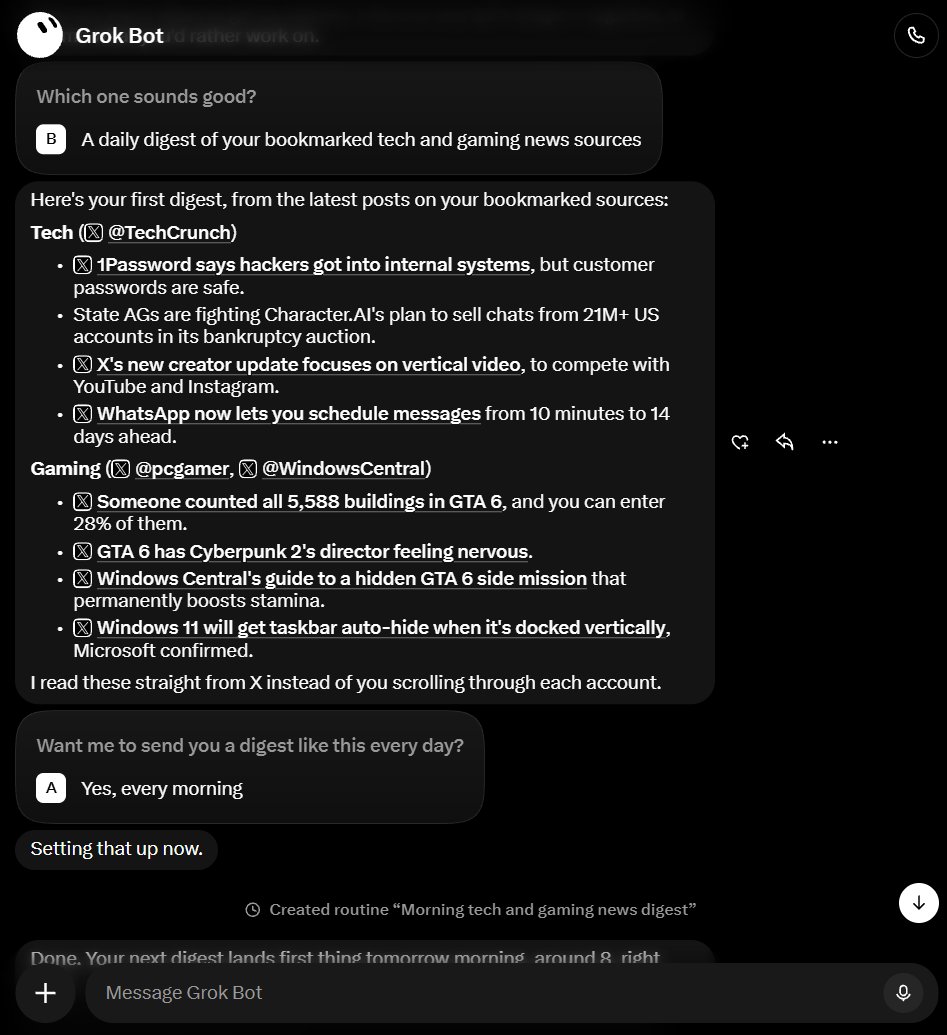
In case you missed it, we recently reported how a free tier was spotted in the works. Turns out the wait was measured in hours, not weeks.
If it hasn’t shown up in your chats yet, give it a bit of time. Rollouts like this rarely flip on for everyone at once.
Honestly, I think this is the right call. The easiest way to get people hooked on Grok Bot is to simply let them use it.
Will you be giving it a try?
Livestream co-hosting is in the works
Next, the one the streamers will care about. X is working on built-in co-hosting for live broadcasts, which would put it in the same company as Instagram, TikTok, YouTube, and Twitch.
The find comes from an X user who goes by @blankspeaker. In X Android 12.47.0-alpha.03, the app carries the pieces of a co-host invite on a live broadcast. If you are invited, a sheet asks “Go live with {name}?” and says they invited you to show as live on their broadcast, and that you can stop at any time. You can Join or tap Not now. Your avatar shows you are live together, your followers get a notification, and a Live now list marks the Host and the Guest.
The screenshots below show the notifications an invitee gets, before and after:

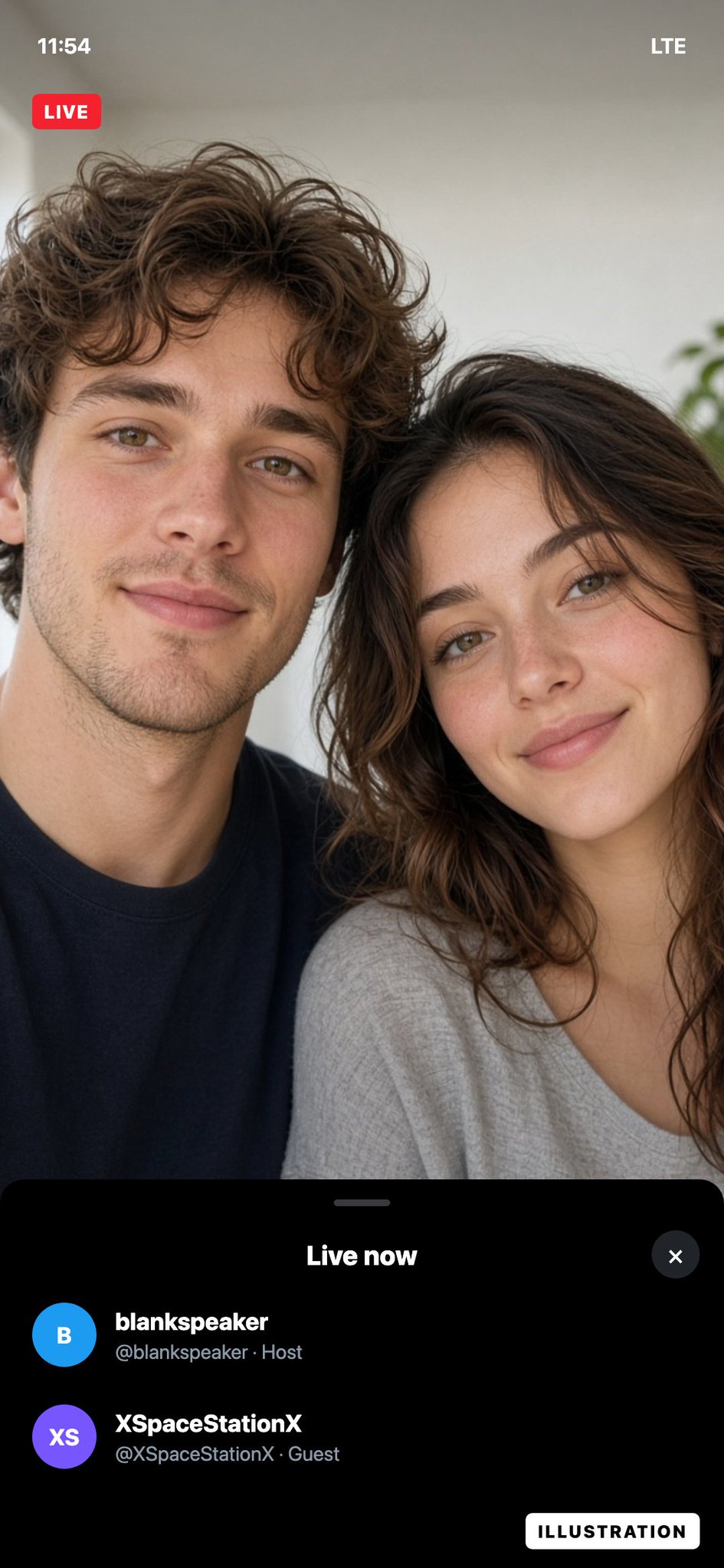
A few caveats before anyone gets excited. This version can only answer an invite — a way to send one isn’t in the app yet. The leaker couldn’t open the real screens either, so the pictures doing the rounds are illustrations, and the feature may behave differently if it actually ships. Nothing here is officially announced.
Pair this with the livestream payouts we recently covered and the picture is pretty clear: X wants people broadcasting, and it wants them doing it together.
Would you co-host a stream, or are you strictly a solo act?
Background music for your videos is in testing on Android
Now for what I’d call today’s most practical find. X is testing the ability to add background music to videos you upload, and it’s live for anyone on the X alpha app for Android.
You can pick a track from For you, Trending, or moods, then trim it to the part of the song you want. Here’s how it looks:
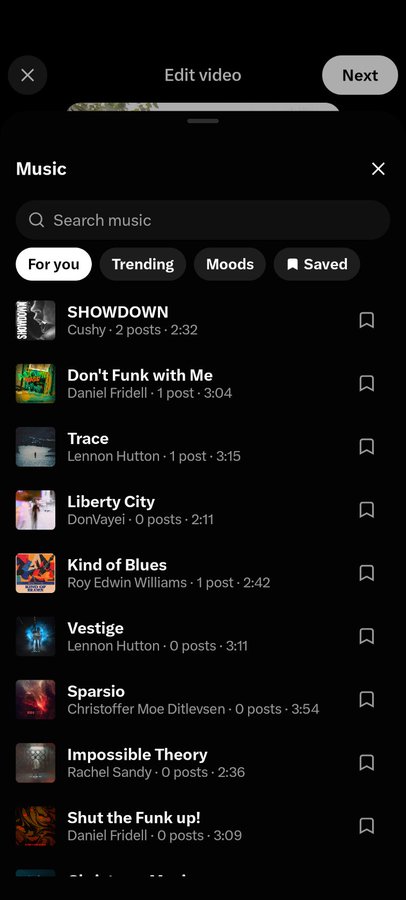
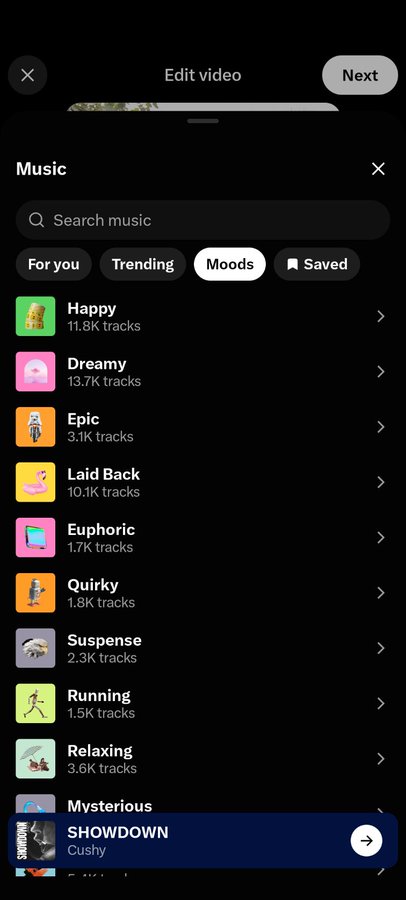
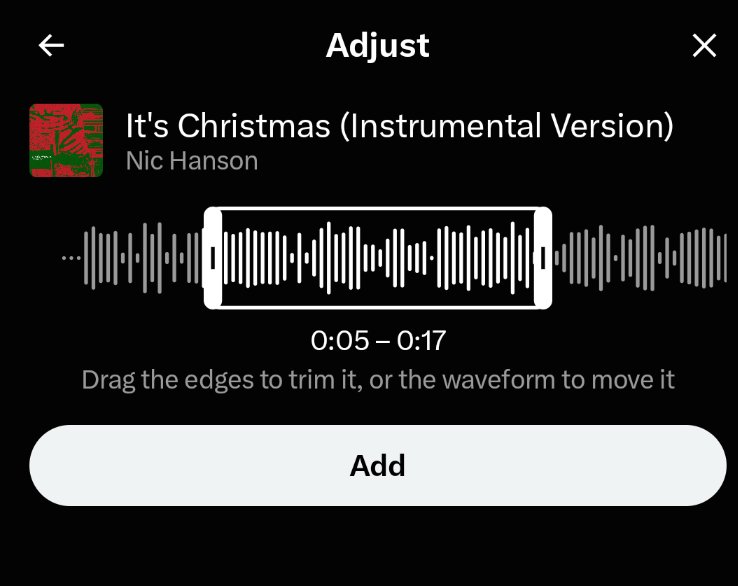
This one’s a big deal for casual creators. Not everyone knows their way around an editor, and after this they won’t need to — if you can upload a video, you can score it. That fits neatly with X’s bigger video push, ever since video became the fastest-growing format on the platform. At least that’s what X says.
Standard alpha disclaimer applies: it’s a test, the song catalog may change, and there’s no word on a stable rollout yet.
The Android photo editor is getting new tools
Sticking with Android, the in-app photo editor is picking up a batch of genuinely useful tools. You can now tune light & color, apply new filters, style your text, pick colors from the photo itself, pinch to zoom, and even blur out details you don’t want others to see.
Here’s the demo:
That blur tool alone is handy. No more third-party apps just to hide a receipt number or a stranger’s face before posting.
As usual with these rollouts, there’s no timeline for the stable app, and iOS users will have to wait their turn. We’ll keep an eye on it.
Do you edit your photos inside X, or do you still outsource that?
XChat may let you download your entire chat history
Leaks corner now. Nima Owji — usually a reliable source when it comes to X-related leaks — reports that XCHAT is working on letting you download your whole chat history:
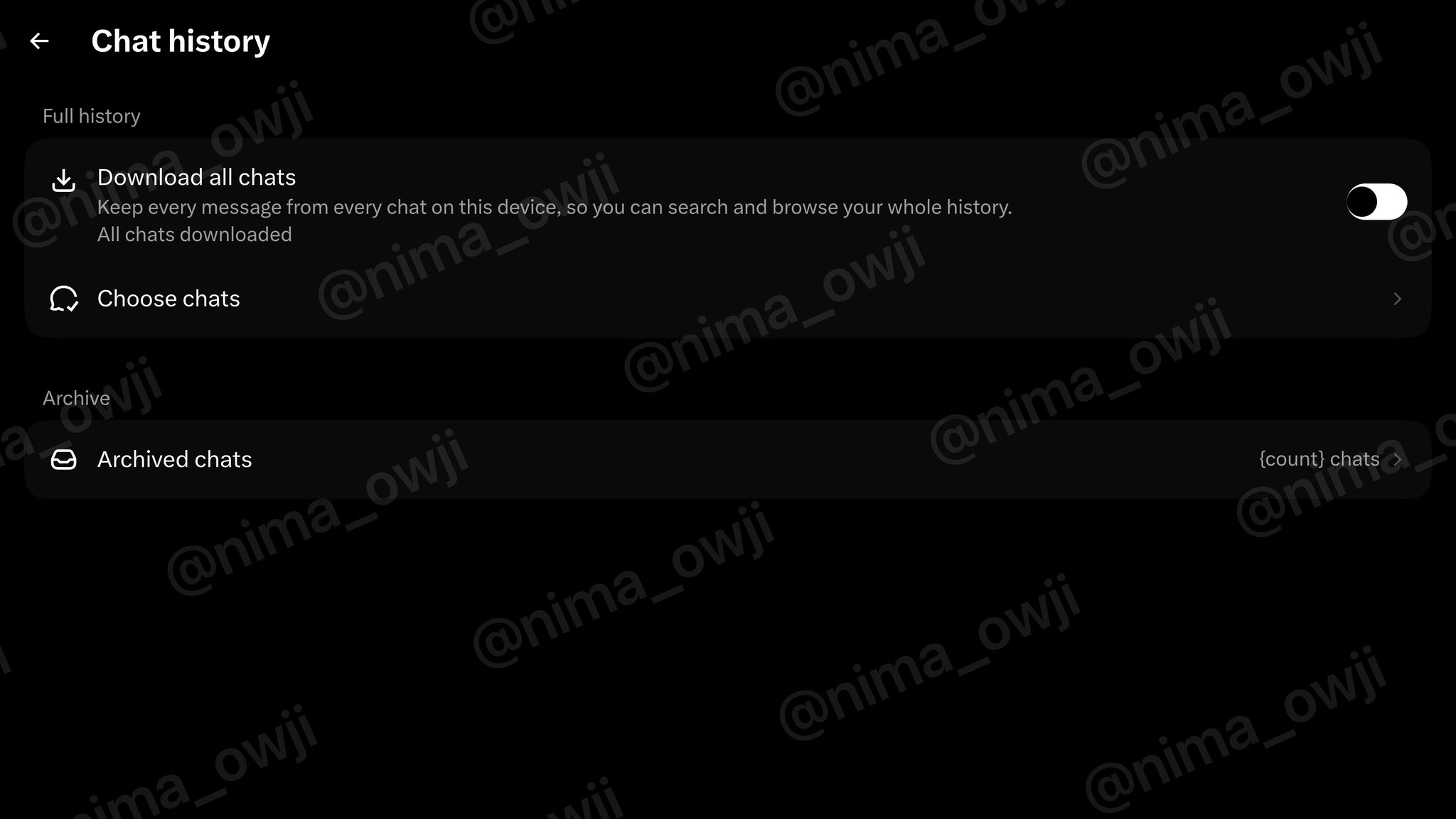
Keep in mind this is a leak, not an official announcement, so the feature could change or not ship at all.
Still, I can think of a few scenarios where it’d come in handy. If a conversation ever goes south, having the complete interaction saved beats scrolling back through months of screenshots hunting for proof.
XChat has been through its share of changes lately — we recently discussed how legacy group support is ending — so a proper export option would be a welcome bit of give after all that take.
Grok Bot is learning to book event tickets
Back to Grok Bot, because the skill list keeps growing. Not only calls and restaurant reservations — it may soon book event tickets for games, shows, or movies. And while booking, it even lets you compare prices from different sellers. Take a look:
SpaceXSI is testing event tickets in Grok Bot 🎟️
Ask for a game, show or movie and it lays out cards with photos for each event. Open one to pick seats and how many tickets, compare prices from different sellers, and see other dates and the lineup.
Once you have tickets, they… https://t.co/syPk5fjIIt pic.twitter.com/BARQ2FGjza
— ️ (@blankspeaker) November 25, 2026
As the clip shows, ask for a game, show or movie and it lays out cards with photos for each event. Open one to pick seats and how many tickets, and you can see other dates and the lineup too.
Same disclaimer as ever: this is still being tested and hasn’t been announced, so don’t plan your next concert around it just yet.
Grok Bot has been on a real feature spree — recently it started suggesting prompts, and now it wants to handle your evenings. At this pace, ask it for the moon, and it may just book the trip.
Would you trust a bot with your ticket money?
Scheduling posts is now live on Android
Some good news our own team spotted today: the ability to schedule posts is now live on X for Android. No more drafting a post at midnight and hoping you remember to send it at a decent hour.

If the option isn’t showing for you yet, these things usually spread in stages, so it shouldn’t be long.
Other minor stuff I stumbled upon while browsing X
Two quick Grok Bot bits to close out.
First, it’s Black Friday season, and the official @bot account wants in:
Grok Bot knows the Black Friday deals. Send Bot your list and let it handle your holiday shopping.
So yes, you can now ask Grok Bot to hunt down the best Black Friday deals for whatever’s on your list. The screenshots below show what other users have been asking their bot to find:


Second, a tip for the iPhone crowd. Evan Bacon, who builds Grok Bot, says the next version will let you add your @bot to the iPhone lock screen. Here’s how to set it up once it arrives: long-press on your lock screen, tap Customize, tap the minus (−) sign on Camera or Flashlight, tap the plus (+) sign, search for “Grok Bot”, select it, and press Done.

Since it’s tied to the next version, don’t be surprised if the search comes up empty for now.
That’s a wrap for today. If you spot something I missed, you know where the comments are.
TechIssuesToday primarily focuses on publishing 'breaking' or 'exclusive' tech news. This means, we are usually the first news website on the whole Internet to highlight the topics we cover daily. So far, our stories have been picked up by many mainstream technology publications like The Verge, Macrumors, Forbes, etc. To know more, head here.



Dwayne Cubbins
1494 Posts
For nearly a decade, I've been deciphering the complexities of the tech world, with a particular passion for helping users navigate the ever-changing tech landscape. From crafting in-depth guides that unlock your phone's hidden potential to uncovering and explaining the latest bugs and glitches, I make sure you get the most out of your devices. And yes, you might occasionally find me ranting about some truly frustrating tech mishaps.


Comments
Follow Us

