









Spotify’s newest desktop update is actively breaking playback for users, forcing songs to stutter and automatically skip to the next track after just a few seconds.
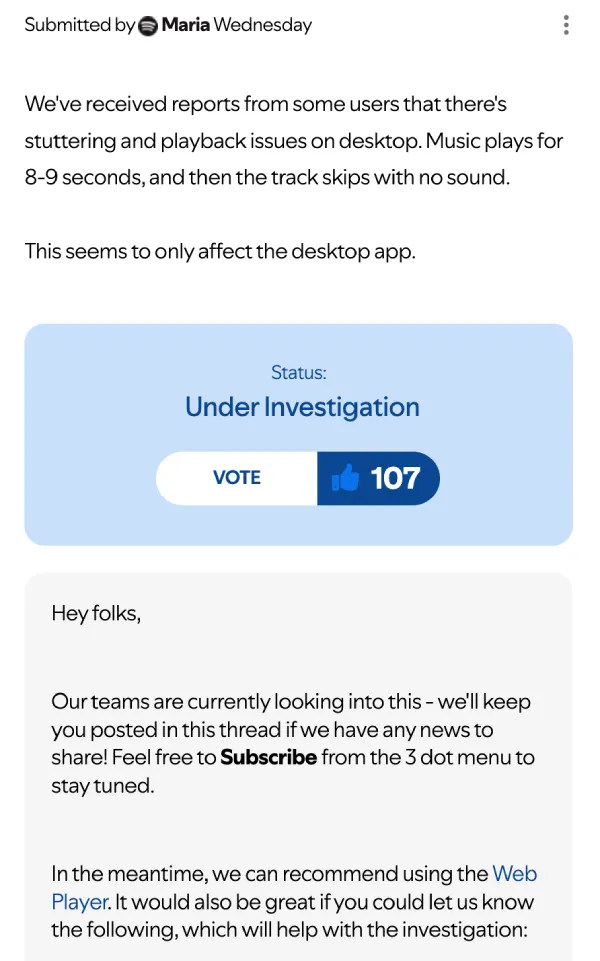
The issue seems widespread and is severely impacting the core function of the app. According to affected users, the music plays normally for about six to nine seconds, abruptly cuts out, and then jumps to the next track.
If that sounds annoying, it is. The glitch turns playlists into unusable 10-second loops.
Luckily, this is entirely contained to the desktop application right now. The web player and mobile apps seem completely fine.
Users have flooded Spotify’s community forums complaining about the problem since the rollout of version 1.2.87.414. People have tried everything you would normally try: clean reinstalls, running as an administrator, disabling hardware acceleration, and clearing the cache. None of it helps.
Spotify moderators have acknowledged the problem. They recently changed the status of the thread to “Under investigation,” advising users to switch to the Web Player for now while the engineering team looks into it.
Just last week, we covered a separate bug where users were logging in to find their Liked Songs completely wiped out. That issue has since been resolved, but seeing another critical bug pop up this fast is not a great sign.
If you cannot stand using the web player, there is a community-sourced workaround that is actually working.
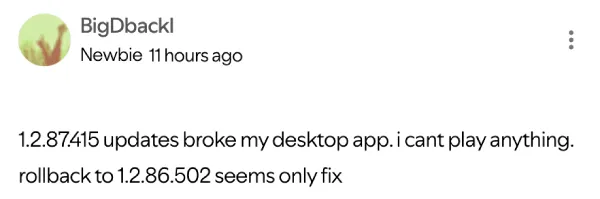
Users have found that rolling the desktop app back to the previous build — specifically version 1.2.86.502 — fixes the playback completely. The old version seems to work just fine, according to several users who switched over.
You can grab the older installer from reliable third-party repositories like Loadspot.
Just be warned: the desktop app is notoriously aggressive about auto-updating. If you close the program entirely, it will likely pull down the broken 1.2.87 update the next time you boot it up. So, if you downgrade, leave the app running, or be prepared to run the installer again if it accidentally updates itself.
Spotify has not provided an exact timeline for when a patch will roll out. Until they do, rolling back your version or sticking to the browser are your only real options.
Featured image generated with AI
TechIssuesToday primarily focuses on publishing 'breaking' or 'exclusive' tech news. This means, we are usually the first news website on the whole Internet to highlight the topics we cover daily. So far, our stories have been picked up by many mainstream technology publications like The Verge, Macrumors, Forbes, etc. To know more, head here.



Dwayne Cubbins
1475 Posts
For nearly a decade, I've been deciphering the complexities of the tech world, with a particular passion for helping users navigate the ever-changing tech landscape. From crafting in-depth guides that unlock your phone's hidden potential to uncovering and explaining the latest bugs and glitches, I make sure you get the most out of your devices. And yes, you might occasionally find me ranting about some truly frustrating tech mishaps.


Follow Us

